Running a successful event requires managing dozens of moving parts at once. You coordinate vendors, manage speakers, keep schedules running on time, and handle unexpected technical glitches.
However, one crucial task often gets pushed to the background: asking attendees for their opinion.
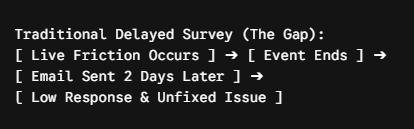
Traditionally, planners wait until an event ends to send out email questionnaires. By that time, attendees have already moved on with their day. Memory fades, response rates drop, and critical opportunities to fix live issues slip away.
Switching to an online event feedback survey allows you to gather thoughts instantly while your audience is still engaged.
In this guide, you will learn how to capture immediate insights, ask the right post event survey questions, utilize modern event feedback tools, and use real time QR code feedback for live events to protect your attendee experience on the spot.
The Problem with Waiting Until the Event Is Over
Most planners rely on post-event emails sent 24 to 48 hours after the final session. While these emails have their place, relying on them exclusively creates several blind spots.
Why Delayed Feedback Fails
- Low Response Rates: Post-event emails often yield single-digit completion rates because inbox clutter takes over.
- Vague Answers: Attendees forget specific session details, vendor quality, or presentation moments.
- Missed Recovery Windows: If the room temperature is freezing or the audio is muffled during the morning keynote, delayed feedback cannot save that day’s experience.
Collecting live input shifts your strategy from post-mortem reporting to active, real-time event management.
Using Real Time QR Code Feedback for Live Events
To capture thoughts instantly, you must eliminate friction. Asking attendees to type long web addresses into their mobile browsers does not work.
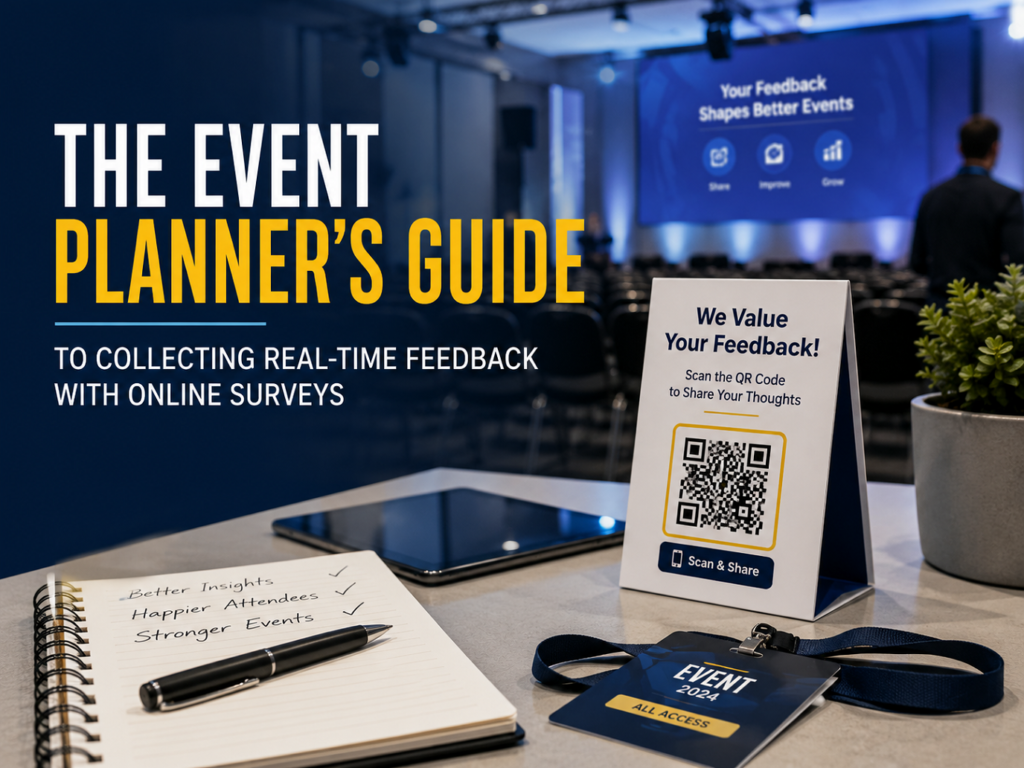
Using real time QR code feedback for live events bridges the gap between the physical venue and your digital forms.
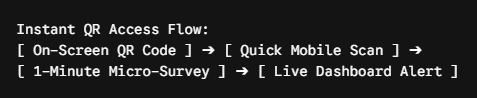
Best Practices for Placing QR Codes
- On-Screen Displays: Show a QR code on main projection screens for two minutes before a speaker begins and right after they finish.
- Table Tents and Badges: Print QR codes directly on attendee lanyards, table cards, or printed agendas.
- Push Notifications: Link directly to the digital form inside your event app or via SMS reminders.
When access requires just a single camera scan, participation rates increase significantly.
The “Survey Flip” Method: Why Shorter, Well-Timed Chunks Work Better
A common mistake planners make is presenting attendees with a single, daunting 20-question form at the end of the day. Modern audiences simply pass on long forms.
To solve this, leading event organizers use the survey flip method.
What Is the Survey Flip Method?
Instead of flipping a massive questionnaire onto your audience at the end, the survey flip strategy breaks your evaluation into tiny, micro-surveys distributed at key moments throughout the day.

Why the Survey Flip Works
- Zero Cognitive Fatigue: Answering one or two questions takes under 30 seconds.
- Contextual Accuracy: Asking about session quality right when the speaker walks off stage yields fresh, accurate reactions.
- Higher Total Completion Rates: Attendees are far more likely to complete three 1-question prompts throughout the day than one 15-question form at night.
By flipping the structure from macro-surveys to micro-touchpoints, you drastically increase both data quantity and data quality.
Essential Post Event Survey Questions to Ask
To keep completion rates high, every question must serve a clear purpose. Focus on short, clear rating scales paired with optional open-text fields.
For Live Sessions and Speakers
- “How valuable was the content shared in this session?” (1–5 Scale)
- “What was your main takeaway from this speaker?” (Open Text)
For Venue and Operations
- “How easy was it to navigate the venue today?” (1–5 Scale)
- “How would you rate today’s lunch and beverage service?” (1–5 Scale)
Overall Event Health
- “Based on your experience today, how likely are you to attend next year?” (NPS 0–10 Scale)
- “What is one thing we could do to make tomorrow even better?” (Open Text)
Case Study: How Live Feedback Rescued a B2B Tech Conference
To see this in practice, consider a real-world example from a three-day national B2B tech conference held in Chicago.
The Event Setup
- Attendees: 2,200 industry professionals
- Format: Keynotes, breakout sessions, and a central vendor expo
- Primary Challenge: High attendee drop-off on Day 2 in previous years
The Live Issue: A Sound and Temperature Crisis
During the morning keynote on Day 1, the main auditorium experienced severe room temperature issues due to an HVAC fault. Additionally, attendees sitting in the back third of the room struggled to hear the speaker due to an uncalibrated audio echo.
In previous years, organizers would have discovered these complaints in a post-event email survey three days later—long after attendees left upset.
The Real-Time Intervention
Because the team deployed real time QR code feedback for live events on the main presentation slides, attendees began scanning and sharing input within 10 minutes of the session starting.
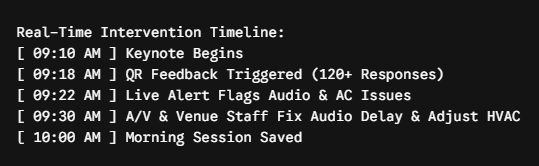
- Instant Identification: Within eight minutes, the event dashboard flagged 47 negative comments regarding audio echoes in Section C and freezing room temperatures.
- Immediate Action: The operations lead messaged the venue’s A/V team via Slack. Engineers re-balanced the rear speakers and adjusted the hall thermostat before the second speaker took the stage.
- Closing the Loop: Before the lunch break, the event host announced on stage: “We heard your feedback about the room temperature and sound—our technical team has adjusted both for the afternoon sessions.”
The Results
- Overall Survey Completion Rate: Reached 42% using micro-prompts (up from 6.2% email completion the prior year).
- Day 2 Retention Rate: Increased by 18% compared to the previous year.
- Net Promoter Score (NPS): Improved by 14 points, directly attributed to fast operational fixes during live sessions.
Modern Event Feedback Tools for Today’s Planner
Choosing the right technology makes collecting live insights effortless. Modern event feedback tools should offer mobile responsiveness, real-time dashboards, and seamless integration with event apps.
| Tool Category | Key Features Needed | Best Use Case |
| In-App Micro-Surveys | Event app integration, push notifications, single-click responses | Enterprise conferences with dedicated mobile apps |
| QR Code Generators | Dynamic URL editing, branded designs, instant mobile rendering | On-site signage, slide decks, printed badges |
| Real-Time Dashboards | Live sentiment alerts, keyword tagging, team notifications | Live control rooms and event operation teams |
Look for solutions that support short, contextual micro-surveys so you can implement the survey flip method without technical friction.
Summary Checklist for Event Planners
To get the most out of your live feedback strategy, follow this quick checklist before your next gathering:
- [ ] Set up short, 1-to-2 question micro-surveys for key agenda touchpoints.
- [ ] Generate high-resolution dynamic QR codes for screens, lanyards, and signage.
- [ ] Test mobile rendering across iOS and Android devices to ensure instant page loading.
- [ ] Assign a team member to monitor the live feedback dashboard during general sessions.
- [ ] Establish a quick communication channel (like Slack or radio) between survey managers and venue staff.
- [ ] Acknowledge feedback on stage to show attendees their input leads to real action.
Elevate Your Next Event with Real-Time Data
Gathering customer input does not have to be a slow, post-event chore.
By replacing long forms with the survey flip strategy and leveraging accessible QR prompts, you transform static surveys into a live operational tool. You catch small issues before they turn into bad reviews, keep your audience engaged, and ensure your event runs smoothly from start to finish.
Ready to upgrade your attendee experience? Start building your online event feedback survey strategy today.
Frequently Asked Questions
1. What is an online event feedback survey?
An online event feedback survey is a digital tool—often accessed via mobile browsers, QR codes, or event apps—that lets planners collect attendee opinions, ratings, and suggestions before, during, or after an event.
2. Why is waiting until after an event to send a survey a bad idea?
Delayed surveys sent days later suffer from extremely low response rates (often under 10%). Attendees forget specific details about sessions or vendors, and planners lose the chance to fix live operational issues—like poor audio or room temperature—while the event is still happening.
3. How do QR codes help collect feedback at live events?
QR codes eliminate friction by allowing attendees to scan a code on presentation screens, lanyards, or table cards using their smartphone cameras. This takes them directly to a short micro-survey without typing long web addresses.
4. What is the “survey flip” method?
The “survey flip” method flips the traditional survey structure on its head. Instead of giving attendees a single, exhausting 15-to-20 question form at the end of the day, you break it into 1-to-2 question micro-surveys distributed at key moments throughout the agenda.
5. Why does the survey flip method yield higher completion rates?
Shorter micro-surveys take less than 30 seconds to finish, eliminating cognitive fatigue. Because attendees answer questions while their experience with a speaker or session is still fresh, participation rates and data accuracy increase significantly.
6. What are the best post-event survey questions to ask for quick responses?
Keep questions short and focused on actionable insights:
- Session Quality: “How valuable was this session to your work?” (1–5 scale)
- Operational UX: “How easy was it to navigate the venue today?” (1–5 scale)
- Overall Value: “How likely are you to attend next year?” (NPS 0–10 scale)
- Open Feedback: “What is one thing we could fix for tomorrow?” (Short text)
7. How can real-time survey feedback fix live event problems?
When real-time feedback feeds into a central dashboard, event managers receive instant alerts about issues like bad room temperatures, broken A/V equipment, or delayed catering, allowing staff to resolve the problem immediately.
8. Will asking for feedback during an event distract attendees?
Not if timed correctly. Presenting 1-question micro-prompts during natural transition moments—such as right after a keynote wraps up or during lunch breaks—keeps engagement high without interrupting learning or networking.
9. What should planners do when they receive live negative feedback?
Acknowledge it and fix it immediately. Communicating quick wins on stage—such as announcing that the room temperature or audio delay was adjusted—shows attendees that their input drives real action, building trust and engagement.
10. How can tools like SurveyFlip assist with live event surveys?
Platforms like SurveyFlip enable planners to build lightweight, mobile-responsive micro-surveys, generate high-resolution dynamic QR codes, and view real-time feedback analytics on an operational dashboard during live events.