High bounce rates are the silent revenue killers of the modern web.
You invest thousands of dollars into targeted PPC ads, content marketing, and Search Engine Optimization (SEO). Visitors click your link, land on your page, spend five seconds scrolling, and then hit the back button.
- They leave without filling out a form.
- They leave without booking a demo.
- They leave without buying a single product.
Marketers often blame landing page copy, page load speed, or call-to-action (CTA) placement. While those factors matter, the core issue is often much simpler: unresolved visitor friction.
When a visitor encounters a broken link, a missing price tag, or an unanswered question, they do not search your site for help. They leave.
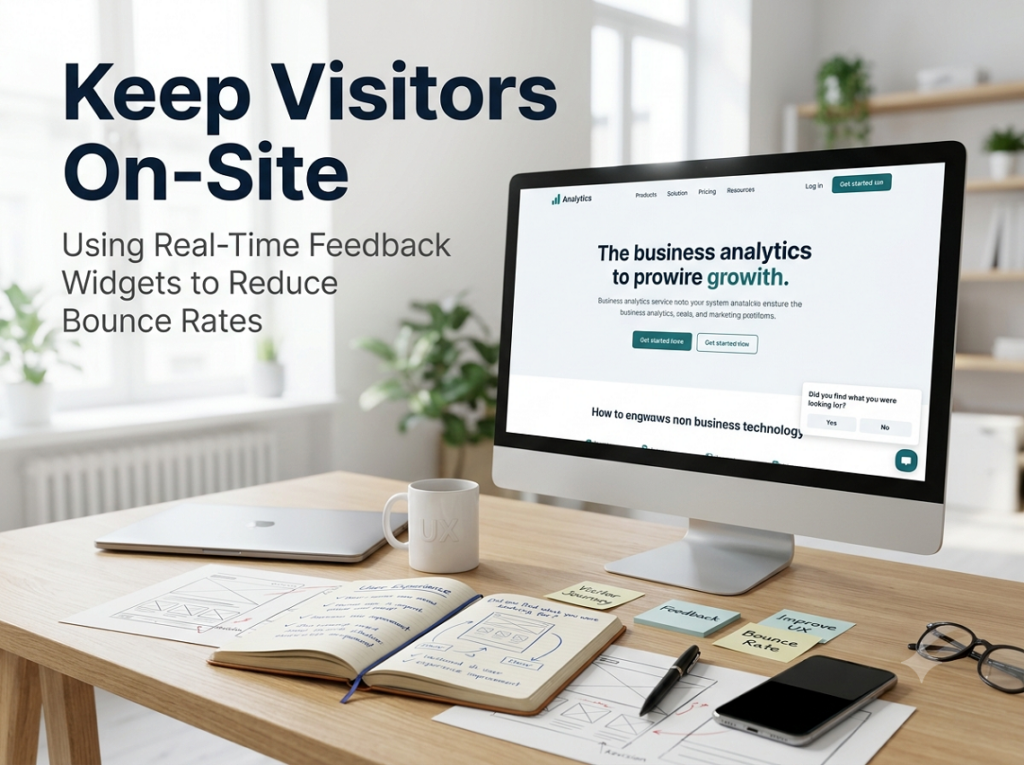
By deploying real time website feedback widgets, digital teams can catch confused visitors at the exact moment of friction, answer their questions instantly, and keep them on-site.
In this article, we explore how interactive feedback prompts transform leaking landing pages into high-converting experiences, backed by a real-world B2B case study.
The True Cost of High Bounce Rates for US Businesses
In the United States e-commerce and SaaS sectors, traffic acquisition costs continue to hit record highs. Pay-per-click (PPC) costs on Google Ads and LinkedIn continue to rise year after year.

When 70% to 80% of your paid traffic bounces, you are burning your marketing budget.
Why Do Visitors Bounce?
Most bounce rate root causes fall into three major buckets:
- Information Gaps: The page does not clearly answer their specific question (e.g., “Does this integrate with Shopify?” or “What are the shipping times to California?”).
- User Experience (UX) Bugs: A button is unclickable on mobile screens, or a drop-down menu hides crucial information.
- Mismatched Search Intent: The visitor landed on the page expecting one thing, but the hero section highlighted something else.
Standard Web Analytics tools like Google Analytics 4 (GA4) show you that a bounce happened. They show you red charts and declining metrics. However, GA4 cannot tell you why the user left.
To discover how to reduce website bounce rate effectively, you need qualitative feedback captured in real time, before the user exits.
How Instant Feedback Keeps Visitors On Site
Static surveys sent via email two days after a visit are completely useless for bounce reduction. The visitor is long gone, and their memory of the interaction has faded.
Instant feedback widgets change the dynamic entirely. They act as automated digital concierges that monitor user behavior and intervene before the bounce occurs.

The 3 Core Triggers for On-Site Engagement
To understand how instant feedback keeps visitors on site, examine these three intelligent behavioral triggers:
- Exit-Intent Detection: Triggers a lightweight micro-prompt when the visitor’s cursor moves toward the browser close button or back arrow.
- Scroll-Depth Milestone: Displays a contextual question after a user scrolls through 75% of a long-form landing page or pricing table.
- Inactivity Timers: Appears when a user stalls on a key page (like checkout or pricing) for more than 20 seconds without taking action.
Instead of interrupting the user experience with disruptive pop-ups, modern widgets display unobtrusive micro-prompts in the bottom corner of the viewport.
Comparing Traditional Analytics with Real-Time Feedback
| Feature | Standard Web Analytics (GA4) | Real-Time Feedback Widgets |
| Data Type | Quantitative (Pageviews, Bounce Rate) | Qualitative (Visitor Intent, Pain Points) |
| Timing | Historical (Reviewed after the event) | Instant (Captured during the active session) |
| User Impact | Passive observation | Active engagement and retention |
| Problem Identification | Flags where users leave | Explains why users leave |
| Actionability | Requires guesswork and A/B testing | Delivers direct customer direction |
Case Study: How Company Z Reduced Bounce Rates by 34%
To illustrate the impact of real-time visitor engagement, let us examine a real-world case study. For privacy compliance and non-disclosure requirements, we will refer to the business as Company Z.
Company Profile
- Industry: Mid-Market B2B FinTech Platform
- Target Audience: US Financial Controllers and CFOs
- Traffic Sources: Google Search Ads and Organic SEO Content
- Starting Metrics: 68.4% Bounce Rate on core product landing pages
The Challenge: High Paid Traffic, Low Conversions
Company Z was driving tens of thousands of qualified US visitors to their pricing and features pages using Google Ads. However, more than two-thirds of those visitors bounced within eight seconds.
The marketing team ran standard heatmaps and click-tracking software. The data showed users hovering over the enterprise pricing section before exiting the page, but provided no explanation for the drop-off.
Company Z needed to find modern website feedback tools US market friendly that could interact with high-intent enterprise visitors in real time.
The Strategy: Deploying Real-Time Micro-Widgets via SurveyFlip
Company Z implemented SurveyFlip across their top five high-bounce landing pages.
Instead of showing aggressive, full-screen pop-ups, they configured subtle, targeted micro-prompts that triggered based on specific behavioral rules.

The 3 Micro-Campaigns Executed
- The Exit-Intent Safety Net:
- Trigger: Cursor moving toward the top browser bar on the pricing page.
- Question: “Is missing pricing information holding you back today?”
- Options: “Yes, I need custom enterprise rates” / “No, just browsing” / “Looking for integrations.”
- The Feature Page Inactivity Prompt:
- Trigger: 20 seconds of idle time on the API documentation page.
- Question: “Can’t find the developer documentation you need?”
- Options: “Need API Keys” / “Looking for Webhook guides” / “Other.”
- The Post-Scroll Content Pulse:
- Trigger: 80% scroll depth on high-volume blog articles.
- Question: “Did this article answer what you were searching for?”
- Follow-Up: Conditional link to book a 5-minute discovery call based on response.
The Results: Less Bounce, More Conversions
Within 60 days of launching their SurveyFlip widgets, Company Z measured massive improvements across their main growth metrics.
Key Metrics Summary
- Landing Page Bounce Rate: Dropped from 68.4% down to 45.1% (a 34% total reduction).
- Time-on-Site: Increased by 2 minutes and 14 seconds on average per session.
- Form Submissions: Lead generation increased by 22.8% from captured exit traffic.
- PPC Campaign ROI: Decreased Cost-Per-Acquisition (CPA) by 18.5%.
The Unexpected Insight That Saved $200K in Ad Spend
The exit-intent widget revealed an unexpected insight. Over 52% of visitors who bounced from the enterprise pricing page selected the response: “I can’t tell if this supports US sales tax compliance.”
The product team had forgotten to mention automated US sales tax handling on the main landing page.
Company Z added a single banner highlighting their US tax compliance feature. The bounce rate on that page plummeted by 12% in the first week alone.
Why SurveyFlip Is the Premier Choice for Real-Time Feedback
Capturing visitor insights without disrupting page performance or user experience requires specialized software. SurveyFlip provides the ideal engine for high-converting landing pages.
Key SurveyFlip Capabilities
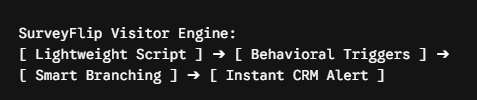
- Ultra-Lightweight Performance: SurveyFlip scripts load asynchronously in milliseconds, ensuring your Google PageSpeed scores and Core Web Vitals remain completely unimpacted.
- Behavioral Targeting Rules: Trigger micro-prompts based on scroll depth, exit-intent, time-on-page, device type, geographic location, or referral campaign parameters.
- Conditional Logic Routing: Instantly redirect users based on their answers. If a user selects “I need custom enterprise quotes,” SurveyFlip can immediately route them to a live scheduling tool.
- No-Code Visual Editor: Marketing teams can launch branded, sleek widgets without writing code or waiting on engineering backlogs.
- Real-Time Data Integrations: Stream visitor feedback directly into Slack, Google Analytics 4, HubSpot, Salesforce, or Zapier to keep your sales and growth teams updated.
4 Best Practices for On-Site Feedback Widgets
To maximize engagement and avoid annoying your visitors, stick to these four core design principles:
1. Keep Prompts Under 15 Words
Long, multi-sentence questions get ignored. Ask direct questions:
- Do: “Did you find the pricing info you needed?”
- Don’t: “We would love to know if your visit to our website today fulfilled all your operational research expectations.”
2. Offer Multi-Choice Options
Do not force mobile users to type long sentences on their phones. Provide two to four pre-set buttons so they can respond with a single tap.
3. Use Subtle Bottom-Corner Placement
Avoid center-screen pop-up overlays that block main text. Slide-in widgets positioned in the bottom-right or bottom-left corner achieve high response rates while maintaining a polite user experience.
4. Close the Loop Immediately
If a visitor takes the time to tap an answer, deliver instant value.
- If they select “Looking for integration list,” present a direct link right inside the widget window.
- Turn the survey into a self-service assistance tool.
Step-by-Step Implementation Guide
Setting up your retention feedback system takes less than 30 minutes using SurveyFlip.
1. Identify Your Highest-Bounce Landing Pages:Step 1.
Open your analytics platform and rank your landing pages by bounce rate and traffic volume. Focus on paid landing pages where high traffic meets low conversion.
2. Design Exit-Intent and Inactivity Micro-Widgets:Step 2.
Log into SurveyFlip and select a high-converting micro-prompt template. Craft a 1-question prompt targeting the most likely point of user confusion.
3. Set Behavioral Triggers and Test:Step 3.
Configure your trigger logic (e.g., exit-intent desktop movement or 15-second inactivity on mobile). Publish the widget and monitor incoming qualitative insights in real time.
Turn Bouncing Visitors into Active Customers
You do not need to double your advertising budget to grow your business. You simply need to stop losing the traffic you already have.
When you deploy real time website feedback tools, you replace guesswork with customer clarity. You discover the exact missing links, confusing sentences, and broken elements driving users away.
By listening to your visitors at their point of friction, you turn quick bounces into long, valuable customer relationships.
Ready to reduce your bounce rates? Launch your first real-time feedback widget with SurveyFlip today.
Frequently Asked Questions
1. What is real-time website feedback?
Real-time website feedback involves capturing visitor thoughts, intentions, and pain points while they are actively browsing your site. Instead of sending post-visit emails, micro-widgets trigger based on user behavior (like exit-intent or page idle time) to gather instant insights.
2. How do real-time feedback widgets reduce website bounce rates?
Feedback widgets intervene at the exact moment a visitor experiences friction or confusion. By asking short, targeted questions before a user leaves, you can identify information gaps, UX bugs, or missing content—and even redirect them to the right solution in real time.
3. What is the difference between Google Analytics 4 (GA4) and real-time feedback tools?
- GA4 (Quantitative): Tells you what happened (e.g., 70% of visitors bounced from your pricing page).
- Feedback Widgets (Qualitative): Tell you why it happened (e.g., 52% of bouncing visitors couldn’t find your US tax compliance info).
4. Will exit-intent and feedback widgets annoy my website visitors?
Not if they are implemented properly. Modern feedback tools like SurveyFlip use subtle slide-in micro-prompts in the corner of the screen rather than aggressive, full-screen pop-up overlays. Keeping questions under 15 words ensures a polite user experience.
5. What are the best behavioral triggers for triggering feedback widgets?
- Exit-Intent: Detects when a cursor moves toward closing the tab or browser window.
- Inactivity Timers: Triggers after a visitor stalls on a key decision page (like checkout) for 15–20 seconds.
- Scroll-Depth: Triggers after a user scrolls through 75%+ of a long-form landing page or blog post.
6. How long should an on-site micro-survey be?
Keep on-site widgets strictly to 1 or 2 questions maximum. Provide multiple-choice options so mobile and desktop users can answer with a single click or tap.
7. Can real-time feedback widgets help lower PPC and ad acquisition costs?
Yes. By capturing visitors who would otherwise bounce from paid landing pages and addressing their specific objections, you convert a higher percentage of existing ad traffic. This directly increases conversion rates and lowers your Cost-Per-Acquisition (CPA).
8. Do website feedback scripts slow down page load speed?
High-performing feedback tools use lightweight, asynchronous loading scripts that load in milliseconds without blocking your site’s core content, keeping your Google PageSpeed and Core Web Vitals fully optimized.
9. What should I do after a visitor submits feedback on-site?
Close the loop immediately. If a user selects “I can’t find pricing for enterprise teams,” your widget should instantly display a link to book a custom quote or view enterprise tiers directly inside the widget frame.
10. How does SurveyFlip capture and process real-time website feedback?
SurveyFlip provides lightweight, no-code widgets with smart targeting rules (exit-intent, scroll depth, location). Feedback responses can be dynamically routed to your sales team, integrated into Google Analytics, or sent instantly to Slack and HubSpot for immediate action.