Every SaaS executive knows the quiet dread of silent churn.
A customer uses your product every day. They pay their invoices on time. Then, without a single support ticket or warning email, they cancel their enterprise subscription.
When your Customer Success (CS) team finally reaches them, the answer is always the same. “The tool just wasn’t meeting our workflow needs anymore.”
That single sentence costs B2B software companies millions in lost Annual Recurrent Revenue (ARR) every year.
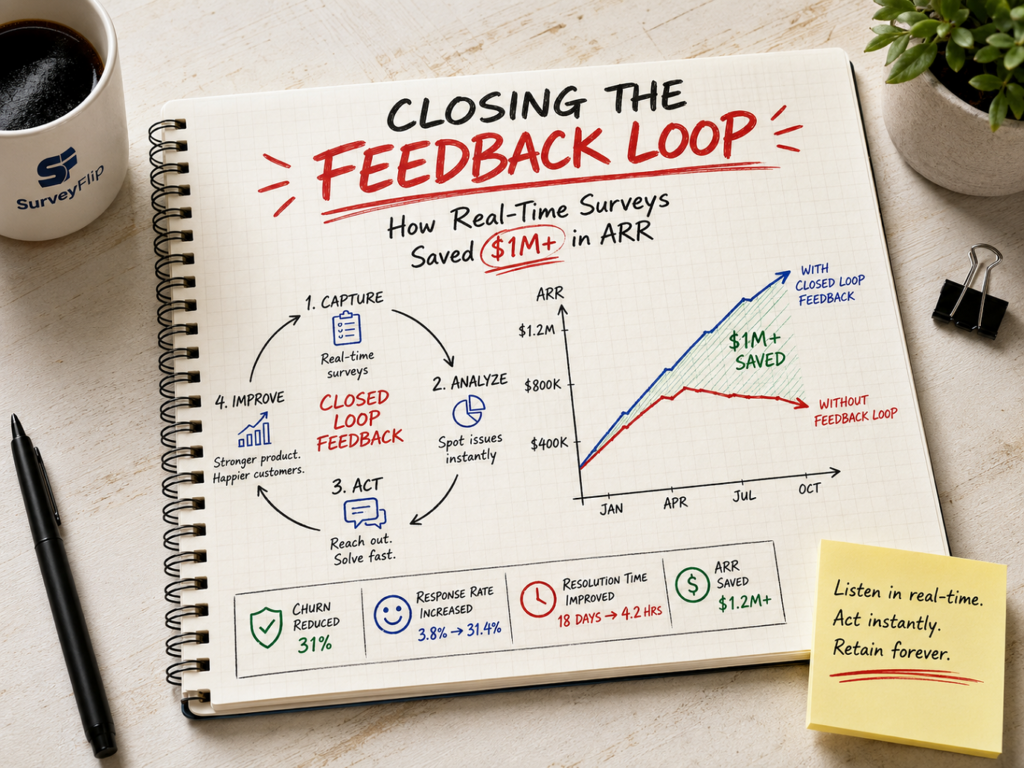
In this customer feedback loop case study, we will explore how one mid-market B2B SaaS company stopped the bleeding. By shifting from traditional quarterly surveys to real-time micro-surveys, they uncovered hidden friction, intervened before accounts cancelled, and saved over $1,200,000 in ARR in under 12 months.
Here is the exact playbook they used, the framework behind their success, and how you can replicate their results.
The Hidden Cost of the Open Feedback Loop
Most SaaS companies think they listen to their users. They send quarterly Net Promoter Score (NPS) emails. Run annual Customer Satisfaction (CSAT) campaigns. They collect feedback in product updates.
Yet, churn continues to creep upward. Why?
Because traditional surveys create an open feedback loop.
An open feedback loop happens when you collect data from customers, store it in a database, aggregate it into a quarterly dashboard, and do nothing immediate with it.

By the time your product team reviews the survey results from March, the unhappy customer who filled it out in January has already signed a contract with your competitor.
Why Traditional Customer Surveys Fail
- Low Response Rates: Long, 10-question survey emails get ignored. Typical email survey response rates hover between 3% and 5%.
- Context Switching: Emailing a user three days after they used a feature means they have forgotten the experience.
- Delayed Action: Feedback sits in a CSV file waiting for a monthly executive sync.
- Zero Follow-Up: The customer gives feedback and hears nothing back. They assume you do not care.
If you want to know how to reduce SaaS churn, you must shorten the distance between a customer experiencing friction and your team taking action. You need a closed loop.
What Is a Closed Loop Feedback Framework?
A closed loop feedback framework is a system where customer responses immediately trigger automated workflows and human outreach.
Instead of treating feedback as static data for research, a closed loop treats feedback as a real-time signal for operational intervention.
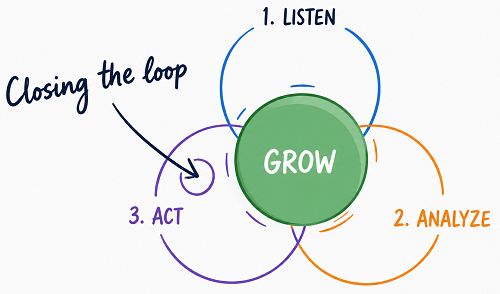
The closed loop process follows four tight steps:
- Capture: Collect real-time feedback inside the product while the user is active.
- Route: Automatically route low scores or specific complaints to the right team in real time.
- Act: Reach out to the customer within hours to solve their specific pain point.
- Inform: Let the customer know when their feedback leads to a fix or product update.
When you close the loop, you turn raw survey responses into a proactive retention engine.
Case Study: How Company X Saved $1.2M in ARR
To see this framework in action, let us look at a real-world case study. For privacy compliance, we will refer to the organization as Company X.
The Company Profile
- Industry: B2B Workflow Automation Software
- Target Audience: Mid-Market and Enterprise Operations Teams (USA)
- Average Contract Value (ACV): $24,000 / year
- Starting Gross Revenue Churn: 14.2% annually
- Primary Challenge: High churn during months 3 to 9 of the customer lifecycle.
The Problem: Silent Attrition
Company X was growing quickly, but churn was eroding their gains. Their CS team ran quarterly NPS email blasts, but fewer than 4% of users completed them.
Worse, 68% of customers who cancelled their accounts had never opened a single support ticket. They were dissatisfied, but they were not complaining. They were simply leaving.
The executive team set a critical objective: turn customer survey data into churn prevention before accounts reached their renewal windows.
The Strategy: Moving from Static Emails to In-App Real-Time Surveys
Company X scrapped their long email surveys entirely. They replaced them with targeted, real-time in-app micro-surveys powered by SurveyFlip.
Instead of asking broad questions once a quarter, they placed 1-question contextual triggers directly inside their web application.
Key Changes Implemented
| Metric / Process | Old Approach (Email) | New Approach (In-App Micro-Surveys) |
| Trigger Point | Calendar-based (Quarterly) | Event-based (Post-feature launch, Onboarding day 30) |
| Length | 8–12 questions | 1–2 questions maximum |
| Response Time | 3–5 days average | Real-time (Instantaneous) |
| Average Response Rate | 3.8% | 31.4% |
| Routing | CSV exported monthly | Instant Slack & Webhook alerts |
Step-By-Step Implementation Plan
Company X rolled out their new retention engine using a four-stage process over 90 days.
1.Identify Critical Friction Hotspots:
Week 1 – 2.
The product and CS teams mapped the user journey to pinpoint where users typically dropped off. They identified three key danger zones: Day 30 onboarding completion, usage of their advanced reporting feature, and account seat management.
2.Deploy Contextual Triggers with SurveyFlip:
Week 3 – 4.
Instead of generic site-wide popups, Company X set up discrete micro-surveys using SurveyFlip. For example, when a user finished exporting an analytics report, a subtle 1-question survey appeared: “Did this report give you the insights you needed today?”
3.Automate Escalation & Response Workflows:
Week 5 – 6.
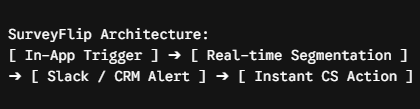
Every response was tagged automatically. If an Enterprise user rated any experience below a 7 out of 10, SurveyFlip immediately pushed a notification to a dedicated #customer-alert Slack channel and created a high-priority task in HubSpot for the account manager.
4.Operationalize 24-Hour Outreach:
Week 7 – 12.
The CS team established a strict Service Level Agreement (SLA): Any account with an ACV over $15,000 that submitted a negative response received a personalized follow-up call or video message within 24 hours.
The Results: Quantitative Impact on ARR and Retention
Within 12 months of deploying their new closed loop system, Company X measured dramatic improvements across every core SaaS health metric.
Financial and Operational Performance
- Net ARR Saved: $1,240,000+ directly attributed to prevented churn.
- Gross Revenue Churn: Dropped from 14.2% down to 7.8%.
- Survey Response Rate: Increased from 3.8% to 31.4%.
- Time to Resolution: Decreased from 18 days down to 4.2 hours.
- Customer Lifetime Value (LTV): Increased by 28%.
3 Specific Interventions That Saved Accounts
To understand how these numbers were achieved, let us look at three real scenarios where real-time feedback directly saved high-value accounts.
1: The Frustrated Power User ($48K ARR Account)
- The Trigger: A VP of Operations at a major logistics firm spent 15 minutes building a custom dashboard in Company X’s app. Upon saving, a 1-question SurveyFlip prompt asked: “How easy was it to build this view?”
- The Score: 2 out of 5 stars.
- The Feedback: “I can’t schedule this to auto-email to my board every Monday.”
- The Action: The Slack alert fired instantly. The CSM saw the response, realized the feature did exist but was hidden under advanced settings, and recorded a 90-second Loom video showing the VP how to enable it.
- The Outcome: The customer replied within an hour: “I was literally looking at alternative vendors because of this. You guys saved me hours.” Account renewed 3 months later.
2: The Onboarding Bottleneck ($24K ARR Account)
- The Trigger: 30 days after signup, an Admin user logged in. A 2-question survey popped up asking about team setup.
- The Score: Net Promoter Score of 4 (Detractor).
- The Feedback: “My team isn’t using it because the CSV importer keeps throwing errors on custom fields.”
- The Action: SurveyFlip routed the feedback directly to both CS and Product. An engineer reviewed the account logs, identified a formatting edge-case, deployed a hotfix in 2 hours, and CS notified the customer.
- The Outcome: The admin successfully onboarded 40 users that week.
3: Identifying Expansion Signals ($36K ARR Account)
- The Trigger: High-frequency user gave a 10/10 score on a post-feature survey.
- The Action: SurveyFlip automatically presented a follow-up question asking if they would be open to testing an enterprise add-on module.
- The Outcome: The account expanded their tier, adding $12,000 in Expansion ARR.
How SurveyFlip Empowers SaaS Teams to Prevent Churn
Implementing a successful customer feedback loop requires tools built for real-time action, not static academic research. That is where SurveyFlip becomes an indispensable asset for growing SaaS teams.
Why SaaS Companies Choose SurveyFlip
- Precision In-App Targeting: Trigger micro-surveys based on exact user actions, page URLs, user roles, or lifecycle stages. Never interrupt a critical workflow again.
- Instant Integration Ecosystem: Connect survey responses directly to Slack, Teams, HubSpot, Salesforce, and Zapier. Get feedback into the tools your team uses every single day.
- No-Code Visual Builder: Build and launch lightweight, beautifully branded surveys in minutes without waiting for engineering sprint cycles.
- Automated Churn Risk Scoring: Categorize negative sentiment automatically and flag at-risk accounts before they reach the cancellation desk.
- High Conversion Rates: Short, contextual, in-app questions yield up to 8x higher response rates than legacy email forms.
How to Build Your Own Churn Reduction Engine
Ready to protect your revenue? Here is how you can set up a closed loop feedback framework in your organization today.
Step 1: Map Your High-Impact Feedback Touchpoints
Do not survey every user on every page. Focus on pivotal moments in the user journey:
- Post-Onboarding (Day 14–30): Catch setup friction early.
- Core Feature Completion: Measure usability right after value creation.
- Support Ticket Resolution: Verify that problems were actually solved.
- Pre-Renewal (90 Days Out): Check health before contract discussions start.
Step 2: Keep Surveys Extremely Short
Rule of thumb: One primary question, one conditional text field.
- Good: “How easy was it to export your data today?” (1-5 Scale)
- Bad: A 12-question form asking about their overall company strategy.
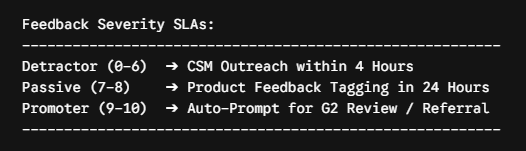
Step 3: Establish Clear Operational SLAs
Data without action is useless. Define who owns each type of response:
Step 4: Show Customers You Listened
When you update a feature or fix a bug based on survey responses, send a targeted update to the specific users who complained.
A simple email saying, “You asked, we built it: Custom CSV exports are now live,” turns former detractors into lifelong brand advocates.
Final Thoughts
Reducing churn isn’t about running exit interviews after a customer leaves. It’s about spotting dissatisfaction while the account can still be saved.
By moving from static email blasts to targeted, real-time in-app surveys, Company X turned customer sentiment into an early warning system—rescuing over $1.2M in ARR in a single year.
If you are ready to stop silent churn and build a proactive retention engine, it is time to close the loop.
Explore how SurveyFlip can help you capture real-time user insights and protect your ARR today.
Frequently Asked Questions
1. What is a customer feedback loop?
A customer feedback loop is a continuous process of gathering user insights, analyzing the data, taking direct action, and informing the customer about the resolution. It becomes a closed loop when feedback immediately triggers operational intervention or follow-up.
2. How does real-time feedback help reduce SaaS churn?
Real-time feedback identifies user friction while the customer is actively using your product. By detecting dissatisfaction early—rather than waiting for quarterly reviews—Customer Success teams can step in within hours to solve issues before the customer decides to cancel.
3. Why do traditional quarterly email surveys fail to stop churn?
Email surveys typically yield low response rates (3% to 5%) and occur out of context. By the time a quarterly survey is sent and analyzed, an unhappy customer has often already stopped using the product or signed a contract with a competitor.
4. What is the ideal response time for responding to negative feedback?
For high-value B2B accounts, the ideal response window for negative feedback (detractors) is under 4 to 24 hours. Reaching out quickly demonstrates that you value their business and drastically increases account recovery rates.
5. How many questions should be included in an in-app survey?
Keep in-app micro-surveys to 1 or 2 questions maximum. Ask one quantifiable rating question (e.g., CSAT, CES, or NPS) and follow up with a single optional open-text field to capture specific context.
6. What is the difference between an open loop and a closed loop feedback framework?
- Open Loop: Collecting feedback, storing it in a database or report, but never following up directly with the customer or taking immediate operational action.
- Closed Loop: Routing feedback in real time to the appropriate team (CS, Product, or Support) and following up with the customer to resolve their concern.
7. When are the best moments in a SaaS user journey to trigger in-app surveys?
Key survey trigger points include:
- Post-Onboarding (Days 14–30): To catch early integration friction.
- Immediately After Core Actions: Such as exporting a report or completing a workflow.
- Pre-Renewal (60–90 days out): To measure account health prior to renewal conversations.
8. How do you motivate non-responsive customers to fill out surveys?
Transition from long email forms to in-app micro-surveys. Asking a single contextual question directly inside the product UI reduces friction and can increase response rates from single digits up to 30%+ .
9. How can small Customer Success teams manage closed-loop follow-ups effectively?
Set up automated routing rules using tools like SurveyFlip. Prioritize human outreach based on account value (ACV) and sentiment severity. Reserve immediate 1-on-1 calls for high-value detractor accounts, while using automated, targeted email sequences for lower-tier segments.
10. How does SurveyFlip integrate into existing CS and Product workflows?
SurveyFlip connects directly with platforms like Slack, Microsoft Teams, HubSpot, Salesforce, and Zapier. When a user submits a response, the data instantly triggers notifications or creates tasks in your team’s daily workspace so no feedback gets missed.